Keywords and Terminology Define Transcript Accuracy
Accurate transcription is not just about hearing words correctly.It is about understanding what those words represent.
Names, terminology, and internal jargon carry meaning.
If they are wrong, the entire transcript—and the resulting Minutes of Meeting—loses credibility.
Transcript credibility is important for us, and here is how we achieve it with AI Transcript.
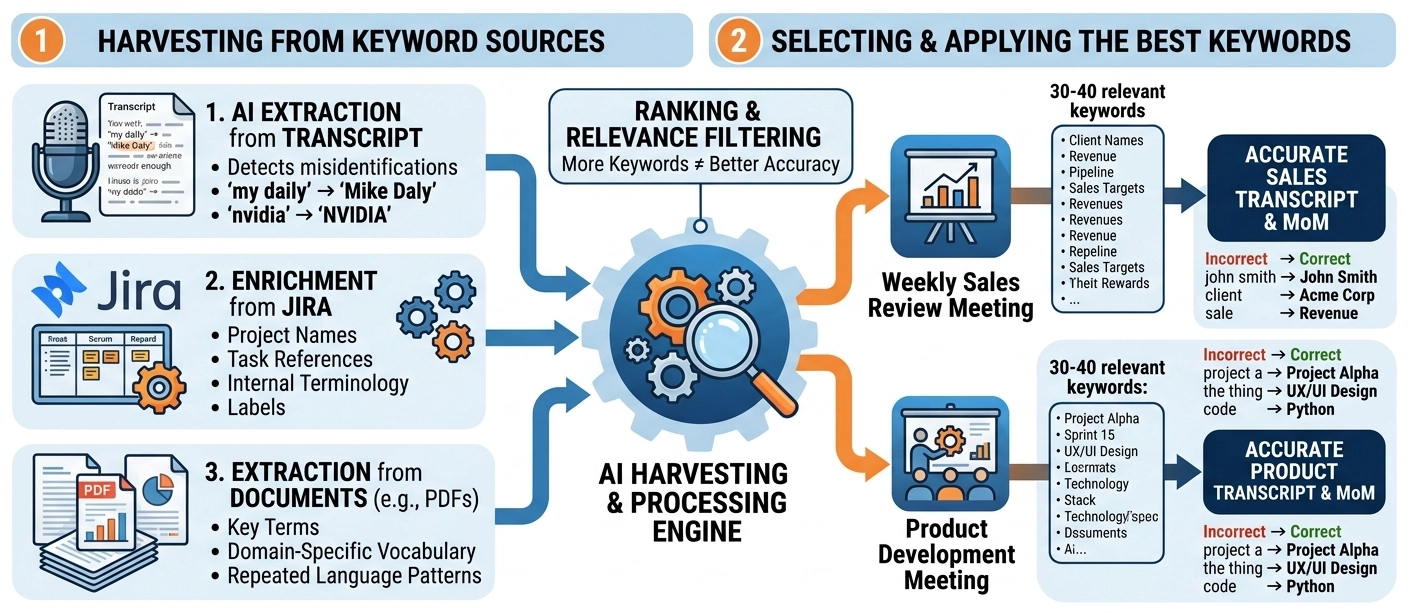
Correct Names Are Non-Negotiable
No organization wants to distribute Minutes of Meeting where:
- “Mike Daly” becomes “My Daily”
- A client name is misspelled
- A senior executive is misidentified
These are not minor errors. They undermine trust in the entire document.
Names must be:
- Correctly spelled
- Consistently used
- Properly capitalized
Three Types of Language That Must Be Controlled
To achieve reliable transcription, three distinct categories must be managed:
1. Keywords (Primarily Names)
These include:
- People (e.g. “John Smith”, not “john smith”)
- Clients
- Projects
- Products
Keywords define who and what the conversation is about.
2. Terms (Standard Industry or Technical Language)
These include:
- Company names (e.g. “NVIDIA”, not “nvidia”)
- Technologies
- Tools and platforms
- Industry-standard terminology
These terms ensure the transcript reflects professional and technical accuracy.
3. Company Jargon (Internal Language)
Every organization has its own language:
- Internal project names
- Abbreviations
- Team-specific shorthand
- Process terminology
This is often the hardest for generic AI systems to interpret correctly.
Capturing this correctly is what separates generic transcription from organization-aware transcription.
How Keywords Are Identified and Applied in AI Transcript
Keyword accuracy is not manual—it is built through a structured process.
Step 1: AI Extraction from Transcript
When audio is converted into a transcript, AI analyses the text to:
- Detect words that may be incorrect
- Identify likely names, terms, and entities
- Suggest corrections based on context
For example:
- “my daily” → likely “Mike Daly”
- “nvidia” → “NVIDIA”
These suggestions are then presented for human validation in the HITL process.
Step 2: Enrichment from Jira
We integrate with Jira to extract:
- Project names
- Task references
- Internal terminology
- Frequently used labels
This allows the system to align transcription with how your organization actually works.
Step 3: Extraction from Documents (e.g. PDFs)
We analyze internal documents such as:
- Project documentation
- Reports
- Technical specifications
From these, we extract:
- Key terms
- Domain-specific vocabulary
- Repeated language patterns
This expands the system’s understanding beyond a single meeting.