Why Keywords and Terminology Define Transcript Accuracy
Getting names, terms, and internal language right—every time
Accurate transcription is not just about hearing words correctly.
It is about understanding what those words represent.
Names, terminology, and internal jargon carry meaning.
If they are wrong, the entire transcript—and the resulting Minutes of Meeting—loses credibility.
Transcript credibility is important for us, and here is how we achieve it with AI Transcript.
Correct Names Are Non-Negotiable
No organization wants to distribute Minutes of Meeting where:
- “Mike Daly” becomes “My Daily”
- A client name is misspelled
- A senior executive is misidentified
These are not minor errors. They undermine trust in the entire document.
Names must be:
- Correctly spelled
- Consistently used
- Properly capitalized
Even small deviations can change meaning or create confusion.
Precision Includes Capitalization
In business communication, formatting carries meaning.
For example:
- “AI” is not the same as “ai”
- “Microsoft” is not “microsoft”
Incorrect capitalization signals lack of accuracy and reduces confidence in the output.
High-quality transcripts standardize these automatically—but only when the system knows what to look for.
Three Types of Language That Must Be Controlled
To achieve reliable transcription, three distinct categories must be managed:
1. Keywords (Primarily Names)
These include:
- People (e.g. “John Smith”, not “john smith”)
- Clients
- Projects
- Products
Keywords define who and what the conversation is about.
2. Terms (Standard Industry or Technical Language)
These include:
- Company names (e.g. “NVIDIA”, not “nvidia”)
- Technologies
- Tools and platforms
- Industry-standard terminology
These terms ensure the transcript reflects professional and technical accuracy.
3. Company Jargon (Internal Language)
Every organization has its own language:
- Internal project names
- Abbreviations
- Team-specific shorthand
- Process terminology
This is often the hardest for generic AI systems to interpret correctly.
Capturing this correctly is what separates generic transcription from organization-aware transcription.
How Keywords Are Identified and Applied in AI Transcript
Keyword accuracy is not manual—it is built through a structured process.
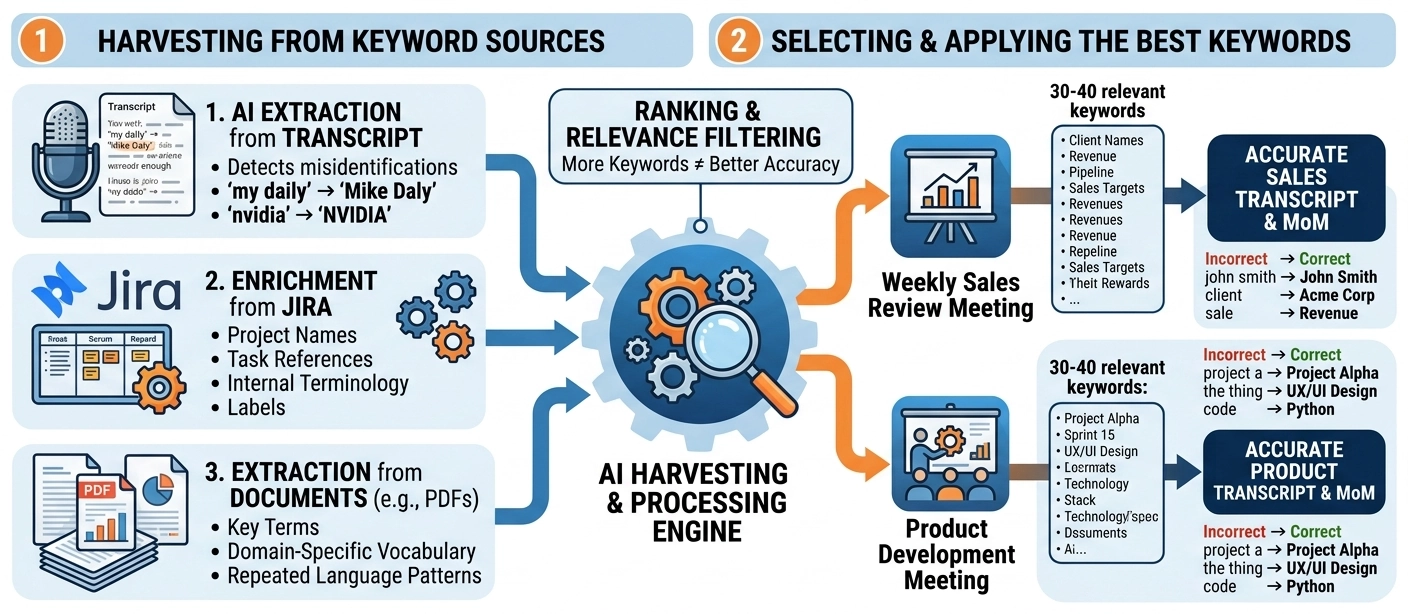
Step 1: AI Extraction from Transcript
When audio is converted into a transcript, AI analyses the text to:
- Detect words that may be incorrect
- Identify likely names, terms, and entities
- Suggest corrections based on context
For example:
- “my daily” → likely “Mike Daly”
- “nvidia” → “NVIDIA”
These suggestions are then presented for human validation in the HITL process.
Step 2: Enrichment from Jira
We integrate with Jira to extract:
- Project names
- Task references
- Internal terminology
- Frequently used labels
This allows the system to align transcription with how your organization actually works.
Step 3: Extraction from Documents (e.g. PDFs)
We analyze internal documents such as:
- Project documentation
- Reports
- Technical specifications
From these, we extract:
- Key terms
- Domain-specific vocabulary
- Repeated language patterns
This expands the system’s understanding beyond a single meeting.
More Keywords Does Not Mean Better Accuracy
It is easy to generate hundreds of keywords.
However, overloading the system creates the opposite effect:
- Increased ambiguity
- Incorrect substitutions
- Reduced accuracy
In practice, AI performs best when working with a focused, relevant set of terms.
Relevance Over Volume
To maintain accuracy, we:
1. Rank Keywords by Relevance
Keywords are prioritized based on how frequently they appear in the transcript and related data sources.
2. Classify Meeting Types
Each transcript is assigned a meeting type, such as:
- Weekly Sales Review
- Product Development Meeting
- Project Follow-Up
3. Select the Most Relevant Keywords
Instead of using all available terms, we:
- Select a focused set (typically 30–40 keywords)
- Match them to the meeting type
- Prioritize the most relevant and frequently used terms
For example:
A Weekly Sales Meeting will prioritize:
- Client names
- Revenue terms
- Sales pipeline language
While excluding unrelated terms from:
- Internal engineering projects
- Technical development discussions
Summary: Harvesting keywords from different sources for best transcript and MoM
AI-Transcript achieves elite transcription and Minutes of Meeting (MoM) accuracy by recognizing that names, technical terms, and company jargon carry critical business meaning. Rather than using generic, one-size-fits-all speech recognition, the system automatically harvests and filters vocabulary from three core areas: initial context-aware AI text extraction, direct integration with Jira data, and deep parsing of internal company documents (like PDFs). Because overloading a system with data decreases accuracy, AI-Transcript deliberately prioritizes relevance over volume. It uses a structured ranking process to dynamically select a focused set of 30–40 high-priority terms tailored specifically to the exact meeting type (such as a Sales Review vs. an Engineering sync), ensuring organization-aware, professional-grade results.